- Python 79.4%
- JavaScript 11.4%
- HTML 6.2%
- CSS 2.7%
- Shell 0.1%
 745b7872b8
Datasette had two tracing systems since the OpenTelemetry spans landed. The hand-rolled one measures the wrong thing - issue 1730, open since 2022, is about exactly that - and it cannot be rebuilt on top of the new spans without core owning a TracerProvider, which is the one thing the OTel design refuses to do. Rather than carry duplicate instrumentation on the db.execute() hot path indefinitely, the old system goes. Deleted: datasette/tracer.py, the trace_debug setting, the AsgiTracer response-rewriting middleware and the ?_trace=1 query-string argument. - datasette/database.py: the four `with trace(...)` wrappers PR 1 deliberately nested the OTel spans inside are removed and the bodies dedented. That also retires the `# noqa: SIM117` comments those wrappers required - a leftover unnecessary noqa trips ruff's RUF100 - and `kwargs["count"] = count` in execute_write_many, which fed the old tracer only. `git diff -w` on this file shows nothing but the deleted lines. - datasette/views/base.py: stream_csv() still read ?_trace=1 to wrap CSV output in an HTML <textarea> debug page. That whole branch, including the EscapeHtmlWriter selection and the conditional content-type, is gone. The EscapeHtmlWriter class itself stays in datasette.utils - it is an importable public name and removing it would widen the API break. - .github/workflows/deploy-latest.yml no longer passes --setting trace_debug 1. Worth stating precisely, because the ticket claimed otherwise: this would not have broken the deploy. Setting.convert() in cli.py only rewrites a bare name to settings.<name> for *known* settings, so `--setting trace_debug 1` would have been silently accepted as a meaningless top-level config key. The flag is removed because it is dead, not because it errors. Tests. tests/test_tracer.py is deleted outright (6 items). Four other tests used ?_trace=1 as an assertion instrument rather than testing tracing: - test_csv_trace tested the trace mechanism itself - deleted. - test_table_csv_stream_does_not_calculate_facets, test_table_csv_stream_does_not_calculate_counts and test_nocount_nofacet_if_shape_is_object test real behaviour, and are rebuilt against captured spans. All three had silently stopped being able to fail: the facets test looked for "select content, count(*) as n", which facet suggestion has not emitted since it moved to a `with limited as (...)` CTE, and none of the three requested the count or facet work whose suppression they claim to check. The rebuilt versions ask for it explicitly, match strings the current SQL contains, and carry a guard assertion so an empty span list cannot masquerade as a pass. Each was confirmed to fail with the covered code broken. - test_trace_correctly_escaped is kept, renamed test_query_page_escapes_sql, with ?_trace=1 dropped. It ran against ds_client, which has no trace_debug, so it never exercised the tracer - what it actually covered is the query page echoing user SQL into HTML, the surface of the two reflected-XSS advisories in issue 1360, and nothing else in the suite covers it. Deleting it would have quietly dropped that. tests/test_utils.py's pairs_to_nested_config case used settings.trace_debug to check that a later key overrides an earlier one; it now uses template_debug rather than losing the case. Docs: the datasette.tracer section of internals.rst, the trace_debug section of settings.rst, the ?_trace=1 entries in json_api.rst and introspection.rst, and the regenerated cli-reference.rst. changelog.rst gets a breaking-change entry and keeps all its historical ?_trace=1 entries - two of them had to lose a :ref: role pointing at a label this commit deletes, or Sphinx warns on every build. 2368 passed, 39 skipped, 6 xfailed, 15 xpassed, 140 subtests, against 2375 / 141 before. Net -7 tests, fully accounted for: -6 test_tracer.py, -1 test_csv_trace, -1 test_trace_correctly_escaped, +1 test_query_page_escapes_sql. The lost subtest is the per-setting case trace_debug generated in test_settings_are_documented. Co-Authored-By: Claude Opus 5 <noreply@anthropic.com> |
||
|---|---|---|
| .github | ||
| datasette | ||
| demos | ||
| docs | ||
| tests | ||
| .coveragerc | ||
| .dockerignore | ||
| .git-blame-ignore-revs | ||
| .gitattributes | ||
| .gitignore | ||
| .isort.cfg | ||
| .prettierrc | ||
| .readthedocs.yaml | ||
| CODE_OF_CONDUCT.md | ||
| codecov.yml | ||
| Dockerfile | ||
| Justfile | ||
| LICENSE | ||
| MANIFEST.in | ||
| package-lock.json | ||
| package.json | ||
| pyproject.toml | ||
| pytest.ini | ||
| README.md | ||
| ruff.toml | ||
| setup.cfg | ||
| test-in-pyodide-with-shot-scraper.sh | ||








An open source multi-tool for exploring and publishing data
Datasette is a tool for exploring and publishing data. It helps people take data of any shape or size and publish that as an interactive, explorable website and accompanying API.
Datasette is aimed at data journalists, museum curators, archivists, local governments, scientists, researchers and anyone else who has data that they wish to share with the world.
Explore a demo, watch a video about the project or try it out on GitHub Codespaces.
- datasette.io is the official project website
- Latest Datasette News
- Comprehensive documentation: https://docs.datasette.io/
- Examples: https://datasette.io/examples
- Live demo of current
mainbranch: https://latest.datasette.io/ - Questions, feedback or want to talk about the project? Join our Discord
Want to stay up-to-date with the project? Subscribe to the Datasette newsletter for tips, tricks and news on what's new in the Datasette ecosystem.
Installation
If you are on a Mac, Homebrew is the easiest way to install Datasette:
brew install datasette
You can also install it using pip or pipx:
pip install datasette
Datasette requires Python 3.8 or higher. We also have detailed installation instructions covering other options such as Docker.
Basic usage
datasette serve path/to/database.db
This will start a web server on port 8001 - visit http://localhost:8001/ to access the web interface.
serve is the default subcommand, you can omit it if you like.
Use Chrome on OS X? You can run datasette against your browser history like so:
datasette ~/Library/Application\ Support/Google/Chrome/Default/History --nolock
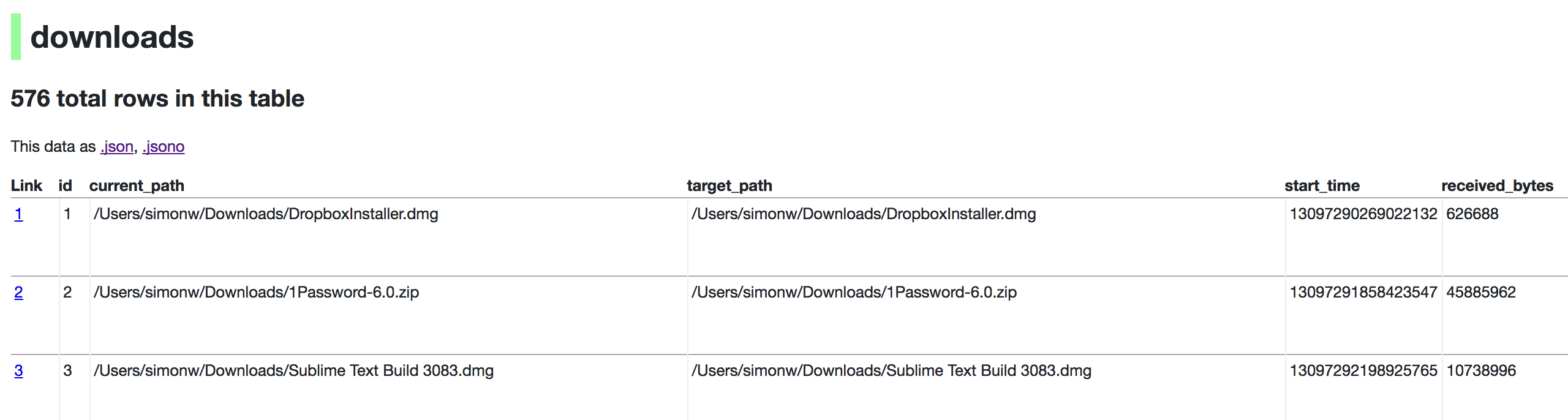
Now visiting http://localhost:8001/History/downloads will show you a web interface to browse your downloads data:
metadata.json
If you want to include licensing and source information in the generated datasette website you can do so using a JSON file that looks something like this:
{
    "title": "Five Thirty Eight",
    "license": "CC Attribution 4.0 License",
    "license_url": "http://creativecommons.org/licenses/by/4.0/",
    "source": "fivethirtyeight/data on GitHub",
    "source_url": "https://github.com/fivethirtyeight/data"
}
Save this in metadata.json and run Datasette like so:
datasette serve fivethirtyeight.db -m metadata.json
The license and source information will be displayed on the index page and in the footer. They will also be included in the JSON produced by the API.
datasette publish
If you have Heroku or Google Cloud Run configured, Datasette can deploy one or more SQLite databases to the internet with a single command:
datasette publish heroku database.db
Or:
datasette publish cloudrun database.db
This will create a docker image containing both the datasette application and the specified SQLite database files. It will then deploy that image to Heroku or Cloud Run and give you a URL to access the resulting website and API.
See Publishing data in the documentation for more details.
Datasette Lite
Datasette Lite is Datasette packaged using WebAssembly so that it runs entirely in your browser, no Python web application server required. Read more about that in the Datasette Lite documentation.