- Python 79.4%
- JavaScript 11.4%
- HTML 6.2%
- CSS 2.7%
- Shell 0.1%
 74cd01860f
The request span was created at the ASGI edge, before anything knew which
route would match, so it carried nothing but the method: every request in a
trace UI showed up as "GET", and the only URL on it was url.path, which is
unbounded on a public instance and useless as a grouping key. Routing
resolves in DatasetteRouter, so that is where the span gets http.route and
its semconv `{method} {route}` name.

http.route is the compiled route pattern, not a prettified
/{database}/{table} template. Datasette routes with compiled regexes and the
route table is fixed when the app is built, so the pattern is exact, bounded
and needs no parsing; the transform into something prettier accretes edge
cases, and Django's instrumentation ships regex-flavoured routes for the same
reason. A request that matches no route gets no http.route and keeps its bare
method name, which is what semantic conventions ask for.

Two things the obvious implementation gets wrong, both found by testing it:

- The router must not read `get_current_span()`. A plugin asgi_wrapper()
  runs *inside* the request middleware, so an instrumented plugin makes its
  own span current for the whole request - and the route then lands on that
  plugin's INTERNAL span, renaming it, while the actual request span never
  gets the one attribute a trace UI groups by. It reproduces with a five-line
  plugin. The span is passed through the ASGI scope instead, falling back to
  the current span so an externally-created SERVER span is still enriched.

- The method has to be clamped again here. The middleware clamps it for the
  attribute, but the name is rebuilt from request.method, which is the raw
  client string - so an unclamped rename put `FROB /(?P<database>...` back
  into the span name that the middleware had just kept it out of.

Both guards are `is_recording()`, not `get_span_context().is_valid`: with no
provider but an inbound traceparent the API returns a NonRecordingSpan
carrying the remote context, which is valid and records nothing, so an
is_valid guard would do the work on every request from a traced caller.

Tests cover the route and name, the unrouted 404 fallback, the full attribute
set, db.query spans reaching the request span by parent walk, a 500, an
inbound traceparent becoming a remote parent, ?sql= never reaching a span
attribute, and - in a subprocess, because the suite's provider fixture is
session-scoped and unavoidable - the no-provider fast path handing the app
the original `send`. The streaming test uses a table larger than one page so
the export genuinely issues queries during the body send; without that it
passes however early the span ends.

Measured on this branch against fixtures.db: a faceted table page went from
112 spans in 56 traces to 113 spans in 1.

Co-Authored-By: Claude Opus 5 <noreply@anthropic.com>
|
||
|---|---|---|
| .github | ||
| datasette | ||
| demos | ||
| docs | ||
| tests | ||
| .coveragerc | ||
| .dockerignore | ||
| .git-blame-ignore-revs | ||
| .gitattributes | ||
| .gitignore | ||
| .isort.cfg | ||
| .prettierrc | ||
| .readthedocs.yaml | ||
| CODE_OF_CONDUCT.md | ||
| codecov.yml | ||
| Dockerfile | ||
| Justfile | ||
| LICENSE | ||
| MANIFEST.in | ||
| package-lock.json | ||
| package.json | ||
| pyproject.toml | ||
| pytest.ini | ||
| README.md | ||
| ruff.toml | ||
| setup.cfg | ||
| test-in-pyodide-with-shot-scraper.sh | ||








An open source multi-tool for exploring and publishing data
Datasette is a tool for exploring and publishing data. It helps people take data of any shape or size and publish that as an interactive, explorable website and accompanying API.
Datasette is aimed at data journalists, museum curators, archivists, local governments, scientists, researchers and anyone else who has data that they wish to share with the world.
Explore a demo, watch a video about the project or try it out on GitHub Codespaces.
- datasette.io is the official project website
- Latest Datasette News
- Comprehensive documentation: https://docs.datasette.io/
- Examples: https://datasette.io/examples
- Live demo of current
mainbranch: https://latest.datasette.io/ - Questions, feedback or want to talk about the project? Join our Discord
Want to stay up-to-date with the project? Subscribe to the Datasette newsletter for tips, tricks and news on what's new in the Datasette ecosystem.
Installation
If you are on a Mac, Homebrew is the easiest way to install Datasette:
brew install datasette
You can also install it using pip or pipx:
pip install datasette
Datasette requires Python 3.8 or higher. We also have detailed installation instructions covering other options such as Docker.
Basic usage
datasette serve path/to/database.db
This will start a web server on port 8001 - visit http://localhost:8001/ to access the web interface.
serve is the default subcommand, you can omit it if you like.
Use Chrome on OS X? You can run datasette against your browser history like so:
datasette ~/Library/Application\ Support/Google/Chrome/Default/History --nolock
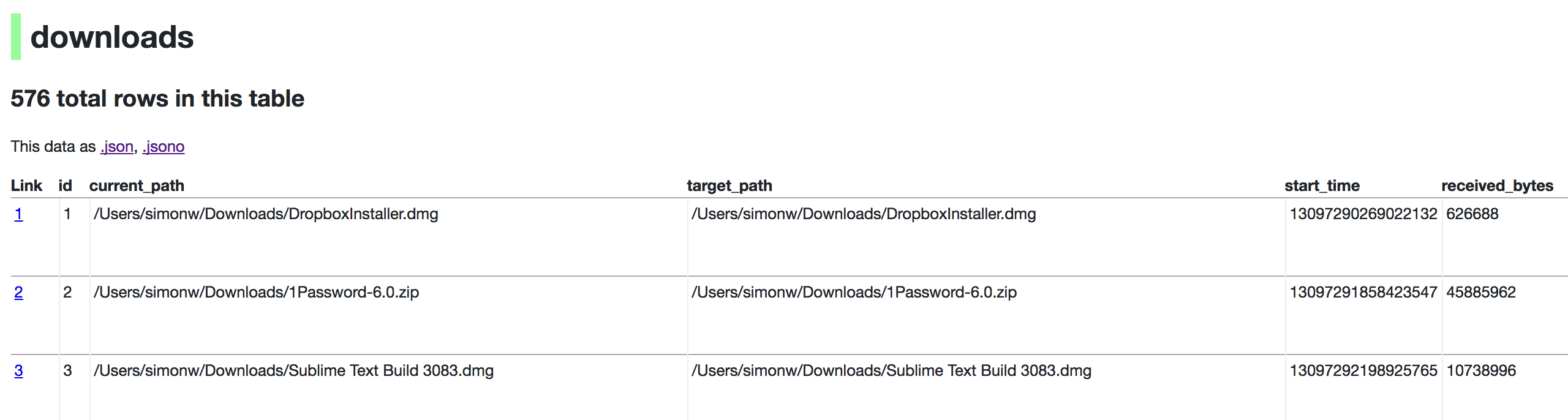
Now visiting http://localhost:8001/History/downloads will show you a web interface to browse your downloads data:
metadata.json
If you want to include licensing and source information in the generated datasette website you can do so using a JSON file that looks something like this:
{
    "title": "Five Thirty Eight",
    "license": "CC Attribution 4.0 License",
    "license_url": "http://creativecommons.org/licenses/by/4.0/",
    "source": "fivethirtyeight/data on GitHub",
    "source_url": "https://github.com/fivethirtyeight/data"
}
Save this in metadata.json and run Datasette like so:
datasette serve fivethirtyeight.db -m metadata.json
The license and source information will be displayed on the index page and in the footer. They will also be included in the JSON produced by the API.
datasette publish
If you have Heroku or Google Cloud Run configured, Datasette can deploy one or more SQLite databases to the internet with a single command:
datasette publish heroku database.db
Or:
datasette publish cloudrun database.db
This will create a docker image containing both the datasette application and the specified SQLite database files. It will then deploy that image to Heroku or Cloud Run and give you a URL to access the resulting website and API.
See Publishing data in the documentation for more details.
Datasette Lite
Datasette Lite is Datasette packaged using WebAssembly so that it runs entirely in your browser, no Python web application server required. Read more about that in the Datasette Lite documentation.