- Python 79.4%
- JavaScript 11.4%
- HTML 6.2%
- CSS 2.7%
- Shell 0.1%
 8194cb5a1d
Datasette core is gaining OpenTelemetry spans alongside the existing hand-rolled tracer. This commit only lays the groundwork - no span is emitted yet. Core takes a runtime dependency on opentelemetry-api and nothing more. It deliberately never creates a TracerProvider, configures an exporter, or touches sampling: that belongs to whoever runs Datasette, normally via an opentelemetry-instrument agent. Owning a provider in core was tried in an earlier design and produced a cross-request span leak, a process-global provider that tests could not tear down, and a sampling env var that silently blanked output. With no provider installed every span is a NonRecordingSpan and costs approximately nothing. datasette/telemetry.py exposes the module-level tracer plus sql_attribute(), which truncates SQL to 2048 characters. On a public instance the SQL is attacker-controlled and unbounded - someone can paste a 10MB query into ?sql= - so it must never reach a telemetry pipeline verbatim. opentelemetry-sdk goes in the dev dependency group only, because the test suite needs it to assert on spans while the package itself must not import it. tests/test_telemetry.py enforces that by importing datasette in a fresh interpreter and inspecting sys.modules, which catches a lazy import inside a function body that a grep would miss. conftest.py gains a session-scoped autouse fixture installing an SDK provider with an InMemorySpanExporter. It has to be session-scoped because set_tracer_provider() is effectively once-per-process - a second call logs a warning and is ignored. SimpleSpanProcessor rather than BatchSpanProcessor, so assertions made right after a request never race a background export thread. The otel_spans fixture that later tickets assert against is added here too. test_datasette_package_never_imports_the_sdk is moved to the front of the run. Late in a serial run the pytest process holds enough threads that the fork half of subprocess' fork+exec segfaults the interpreter on macOS/CPython 3.13. That reproduces with any subprocess call in that position on an unmodified tree, so it is a pre-existing hazard rather than something this commit introduces; the repo already moves its other subprocess-spawning tests to the front for related reasons. Co-Authored-By: Claude Opus 5 <noreply@anthropic.com> |
||
|---|---|---|
| .github | ||
| datasette | ||
| demos | ||
| docs | ||
| tests | ||
| .coveragerc | ||
| .dockerignore | ||
| .git-blame-ignore-revs | ||
| .gitattributes | ||
| .gitignore | ||
| .isort.cfg | ||
| .prettierrc | ||
| .readthedocs.yaml | ||
| CODE_OF_CONDUCT.md | ||
| codecov.yml | ||
| Dockerfile | ||
| Justfile | ||
| LICENSE | ||
| MANIFEST.in | ||
| package-lock.json | ||
| package.json | ||
| pyproject.toml | ||
| pytest.ini | ||
| README.md | ||
| ruff.toml | ||
| setup.cfg | ||
| test-in-pyodide-with-shot-scraper.sh | ||








An open source multi-tool for exploring and publishing data
Datasette is a tool for exploring and publishing data. It helps people take data of any shape or size and publish that as an interactive, explorable website and accompanying API.
Datasette is aimed at data journalists, museum curators, archivists, local governments, scientists, researchers and anyone else who has data that they wish to share with the world.
Explore a demo, watch a video about the project or try it out on GitHub Codespaces.
- datasette.io is the official project website
- Latest Datasette News
- Comprehensive documentation: https://docs.datasette.io/
- Examples: https://datasette.io/examples
- Live demo of current
mainbranch: https://latest.datasette.io/ - Questions, feedback or want to talk about the project? Join our Discord
Want to stay up-to-date with the project? Subscribe to the Datasette newsletter for tips, tricks and news on what's new in the Datasette ecosystem.
Installation
If you are on a Mac, Homebrew is the easiest way to install Datasette:
brew install datasette
You can also install it using pip or pipx:
pip install datasette
Datasette requires Python 3.8 or higher. We also have detailed installation instructions covering other options such as Docker.
Basic usage
datasette serve path/to/database.db
This will start a web server on port 8001 - visit http://localhost:8001/ to access the web interface.
serve is the default subcommand, you can omit it if you like.
Use Chrome on OS X? You can run datasette against your browser history like so:
datasette ~/Library/Application\ Support/Google/Chrome/Default/History --nolock
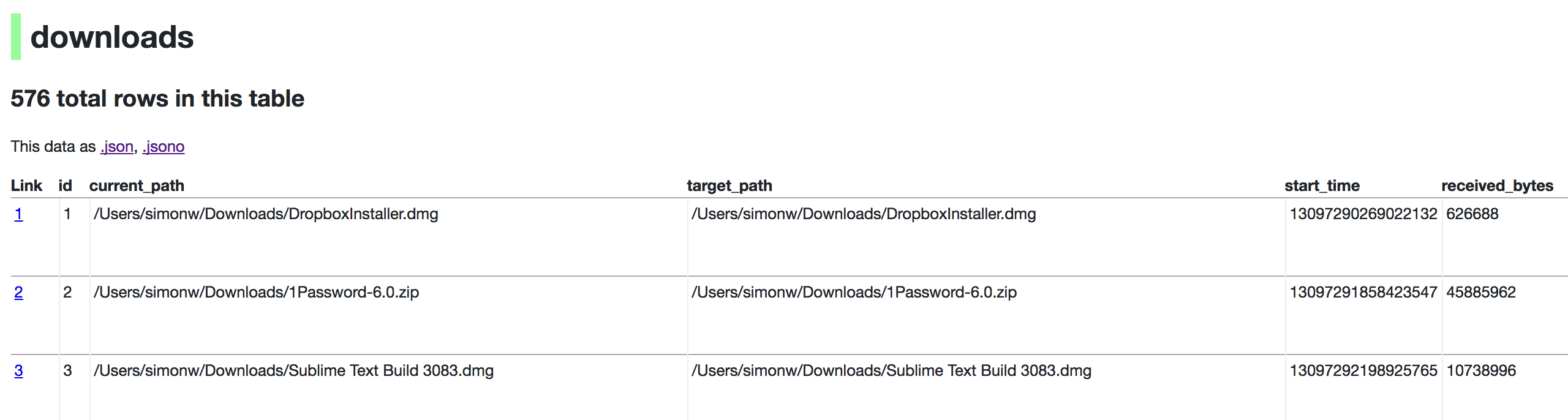
Now visiting http://localhost:8001/History/downloads will show you a web interface to browse your downloads data:
metadata.json
If you want to include licensing and source information in the generated datasette website you can do so using a JSON file that looks something like this:
{
    "title": "Five Thirty Eight",
    "license": "CC Attribution 4.0 License",
    "license_url": "http://creativecommons.org/licenses/by/4.0/",
    "source": "fivethirtyeight/data on GitHub",
    "source_url": "https://github.com/fivethirtyeight/data"
}
Save this in metadata.json and run Datasette like so:
datasette serve fivethirtyeight.db -m metadata.json
The license and source information will be displayed on the index page and in the footer. They will also be included in the JSON produced by the API.
datasette publish
If you have Heroku or Google Cloud Run configured, Datasette can deploy one or more SQLite databases to the internet with a single command:
datasette publish heroku database.db
Or:
datasette publish cloudrun database.db
This will create a docker image containing both the datasette application and the specified SQLite database files. It will then deploy that image to Heroku or Cloud Run and give you a URL to access the resulting website and API.
See Publishing data in the documentation for more details.
Datasette Lite
Datasette Lite is Datasette packaged using WebAssembly so that it runs entirely in your browser, no Python web application server required. Read more about that in the Datasette Lite documentation.