- Python 79.4%
- JavaScript 11.4%
- HTML 6.2%
- CSS 2.7%
- Shell 0.1%
 b40b06f1cb
Datasette's existing tracer times a "sql" block that wraps a good deal more than the query itself - queueing onto the thread pool, the pool wait, and result marshalling all disappear into one number. That is simonw/datasette#1730, "SQL tracing should much more closely track the SQL query execution", open since 2022. A db.query span here is the outer half of the answer; a later change adds the inner span drawn around the sqlite3 call itself, and the gap between the two is exactly the thread pool wait the current tracer folds away. The span carries OTel semantic-convention attributes (db.system, db.namespace, db.query.text) plus a few datasette.* ones. db.query.text goes through sql_attribute(), which caps it at 2048 characters, because on a public instance the SQL is attacker-supplied and unbounded. Only len(params) is recorded, never a parameter value. The existing `with trace(...)` wrapper stays exactly where it is and the new span nests inside it. This change removes nothing: ?_trace=1 and the trace_debug setting keep working unchanged. The two systems are independent code paths. Exception handling on the span is explicit rather than inherited from start_as_current_span's defaults, which would record the exception and set StatusCode.ERROR on anything passing through. That is wrong here because some SQL failures are the expected answer. ArrayFacet.suggest() runs json_type(<column>) against every column precisely to discover which ones raise "malformed JSON", and passes log_sql_errors=False to say so. Left to the defaults, a table with N text columns marks N queries per page as failed - burying genuine failures and tripping any alerting keyed on span status. Measured on a plain table page before this: 4 error spans out of 225, all expected. Suppressed errors now leave the status UNSET and set datasette.sql_error_suppressed instead, so they stay discoverable without reading as failures. QueryInterrupted still sets ERROR unconditionally. That is not quite right either - facet suggestion is designed to time out - but the fix needs its own reasoning and lands separately. Behaviour change worth calling out: time_limit_ms is hoisted out of sql_operation_in_thread so the span can record it on the event loop. It is therefore read at call time rather than at thread-execution time. Benign in practice, since ds.sql_time_limit_ms is set at startup, but it is a real change. Co-Authored-By: Claude Opus 5 <noreply@anthropic.com> |
||
|---|---|---|
| .github | ||
| datasette | ||
| demos | ||
| docs | ||
| tests | ||
| .coveragerc | ||
| .dockerignore | ||
| .git-blame-ignore-revs | ||
| .gitattributes | ||
| .gitignore | ||
| .isort.cfg | ||
| .prettierrc | ||
| .readthedocs.yaml | ||
| CODE_OF_CONDUCT.md | ||
| codecov.yml | ||
| Dockerfile | ||
| Justfile | ||
| LICENSE | ||
| MANIFEST.in | ||
| package-lock.json | ||
| package.json | ||
| pyproject.toml | ||
| pytest.ini | ||
| README.md | ||
| ruff.toml | ||
| setup.cfg | ||
| test-in-pyodide-with-shot-scraper.sh | ||








An open source multi-tool for exploring and publishing data
Datasette is a tool for exploring and publishing data. It helps people take data of any shape or size and publish that as an interactive, explorable website and accompanying API.
Datasette is aimed at data journalists, museum curators, archivists, local governments, scientists, researchers and anyone else who has data that they wish to share with the world.
Explore a demo, watch a video about the project or try it out on GitHub Codespaces.
- datasette.io is the official project website
- Latest Datasette News
- Comprehensive documentation: https://docs.datasette.io/
- Examples: https://datasette.io/examples
- Live demo of current
mainbranch: https://latest.datasette.io/ - Questions, feedback or want to talk about the project? Join our Discord
Want to stay up-to-date with the project? Subscribe to the Datasette newsletter for tips, tricks and news on what's new in the Datasette ecosystem.
Installation
If you are on a Mac, Homebrew is the easiest way to install Datasette:
brew install datasette
You can also install it using pip or pipx:
pip install datasette
Datasette requires Python 3.8 or higher. We also have detailed installation instructions covering other options such as Docker.
Basic usage
datasette serve path/to/database.db
This will start a web server on port 8001 - visit http://localhost:8001/ to access the web interface.
serve is the default subcommand, you can omit it if you like.
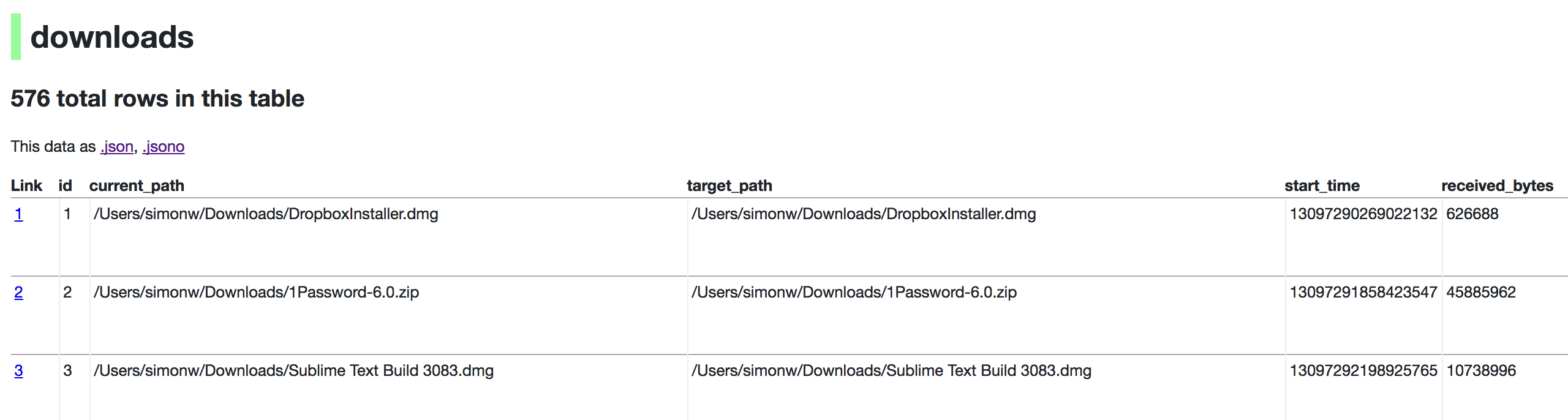
Use Chrome on OS X? You can run datasette against your browser history like so:
datasette ~/Library/Application\ Support/Google/Chrome/Default/History --nolock
Now visiting http://localhost:8001/History/downloads will show you a web interface to browse your downloads data:
metadata.json
If you want to include licensing and source information in the generated datasette website you can do so using a JSON file that looks something like this:
{
    "title": "Five Thirty Eight",
    "license": "CC Attribution 4.0 License",
    "license_url": "http://creativecommons.org/licenses/by/4.0/",
    "source": "fivethirtyeight/data on GitHub",
    "source_url": "https://github.com/fivethirtyeight/data"
}
Save this in metadata.json and run Datasette like so:
datasette serve fivethirtyeight.db -m metadata.json
The license and source information will be displayed on the index page and in the footer. They will also be included in the JSON produced by the API.
datasette publish
If you have Heroku or Google Cloud Run configured, Datasette can deploy one or more SQLite databases to the internet with a single command:
datasette publish heroku database.db
Or:
datasette publish cloudrun database.db
This will create a docker image containing both the datasette application and the specified SQLite database files. It will then deploy that image to Heroku or Cloud Run and give you a URL to access the resulting website and API.
See Publishing data in the documentation for more details.
Datasette Lite
Datasette Lite is Datasette packaged using WebAssembly so that it runs entirely in your browser, no Python web application server required. Read more about that in the Datasette Lite documentation.