- Python 81.9%
- JavaScript 9.8%
- HTML 5.6%
- CSS 2.5%
- Shell 0.1%
 c96dc5ce26
Closes #2649 * Add register_token_handler plugin hook for pluggable token backends Adds a new register_token_handler hook that allows plugins to provide custom token creation and verification backends. This enables plugins like datasette-oauth to issue tokens without depending on specific backend plugins like datasette-auth-tokens. Key changes: - New datasette/tokens.py with TokenHandler base class and SignedTokenHandler (the default signed-token implementation moved here) - New register_token_handler hookspec in hookspecs.py - Datasette.create_token() is now async and delegates to token handlers - New Datasette.verify_token() method tries all handlers in sequence - handler= parameter on create_token() to select a specific backend - TokenHandler exported from datasette package for plugin use - Fixed actor_from_request loop to await all coroutines (avoids warnings) * Add documentation and hook test for register_token_handler Fixes CI failures: the new hook needs a section in docs/plugin_hooks.rst (checked by test_plugin_hooks_are_documented) and a test_hook_* function in test_plugins.py (checked by test_plugin_hooks_have_tests). * Register tokens module as separate default plugin Instead of re-exporting hookimpls from default_permissions/__init__.py, register datasette.default_permissions.tokens as its own DEFAULT_PLUGINS entry. Cleaner and avoids confusing import-for-side-effect patterns. * Replace restrict_x params with TokenRestrictions dataclass Consolidates the three separate restrict_all, restrict_database, and restrict_resource parameters into a single TokenRestrictions dataclass. Cleaner API surface for both Datasette.create_token() and TokenHandler.create_token(). Also clarifies docs re: default handler selection via pluggy ordering. * Add builder methods to TokenRestrictions Adds allow_all(), allow_database(), and allow_resource() methods that return self for chaining. Callers no longer need to manipulate nested dicts directly: restrictions = (TokenRestrictions() .allow_all("view-instance") .allow_database("mydb", "create-table") .allow_resource("mydb", "mytable", "insert-row")) * docs: add 1.0a25 upgrade guide section for create_token() signature change Ref: https://github.com/simonw/datasette/issues/2649#issuecomment-3962639393 * docs: note that create_token() is now async in upgrade guide * docs: update internals, plugin_hooks, authentication for new token API - internals.rst: new async create_token() signature with restrictions and handler params, add TokenRestrictions reference docs - plugin_hooks.rst: show full create_token signature in TokenHandler example, note list returns and error cases - authentication.rst: cross-reference TokenRestrictions from the restrictions section * style: apply black formatting to token handler files * docs: fix RST heading underline length in internals.rst * tests: add restrictions round-trip and expiration tests for token handler Covers allow_database/allow_resource builders, _r payload encoding, and token_expires in verified actors. Coverage 76% -> 90%. * tests: add test for signed tokens disabled * fix: add TokenRestrictions TYPE_CHECKING import to fix ruff F821 * docs: regenerate plugins.rst with cog * docs: reformat code blocks in plugin_hooks.rst with blacken-docs * docs: add await .verify_token() to internals.rst * tests: rewrite register_token_handler test to use real plugin handler Adds a HardcodedTokenHandler to the test plugins dir that creates tokens like dstok_hardcoded_token_1. The test now exercises creating tokens via the default handler (which is the plugin's hardcoded one), by explicitly naming the hardcoded handler, and by explicitly naming the signed handler -- then verifies each token round-trips correctly. * tests: clarify test_token_handler_via_http tests the default signed handler * fix: use handler="signed" explicitly where signed tokens are expected The HardcodedTokenHandler in my_plugin.py gets globally registered, so create_token() without a handler name picks it up as the default. Fix the create-token view, CLI, and tests to explicitly request the signed handler where they depend on signed token behavior. * fix: use handler="signed" in test_create_table_permissions https://claude.ai/code/session_013cQFiDQjYRrRBH2biFfKuS |
||
|---|---|---|
| .github | ||
| datasette | ||
| demos | ||
| docs | ||
| tests | ||
| .coveragerc | ||
| .dockerignore | ||
| .git-blame-ignore-revs | ||
| .gitattributes | ||
| .gitignore | ||
| .isort.cfg | ||
| .prettierrc | ||
| .readthedocs.yaml | ||
| CODE_OF_CONDUCT.md | ||
| codecov.yml | ||
| Dockerfile | ||
| Justfile | ||
| LICENSE | ||
| MANIFEST.in | ||
| package-lock.json | ||
| package.json | ||
| pyproject.toml | ||
| pytest.ini | ||
| README.md | ||
| ruff.toml | ||
| setup.cfg | ||
| test-in-pyodide-with-shot-scraper.sh | ||








An open source multi-tool for exploring and publishing data
Datasette is a tool for exploring and publishing data. It helps people take data of any shape or size and publish that as an interactive, explorable website and accompanying API.
Datasette is aimed at data journalists, museum curators, archivists, local governments, scientists, researchers and anyone else who has data that they wish to share with the world.
Explore a demo, watch a video about the project or try it out on GitHub Codespaces.
- datasette.io is the official project website
- Latest Datasette News
- Comprehensive documentation: https://docs.datasette.io/
- Examples: https://datasette.io/examples
- Live demo of current
mainbranch: https://latest.datasette.io/ - Questions, feedback or want to talk about the project? Join our Discord
Want to stay up-to-date with the project? Subscribe to the Datasette newsletter for tips, tricks and news on what's new in the Datasette ecosystem.
Installation
If you are on a Mac, Homebrew is the easiest way to install Datasette:
brew install datasette
You can also install it using pip or pipx:
pip install datasette
Datasette requires Python 3.8 or higher. We also have detailed installation instructions covering other options such as Docker.
Basic usage
datasette serve path/to/database.db
This will start a web server on port 8001 - visit http://localhost:8001/ to access the web interface.
serve is the default subcommand, you can omit it if you like.
Use Chrome on OS X? You can run datasette against your browser history like so:
datasette ~/Library/Application\ Support/Google/Chrome/Default/History --nolock
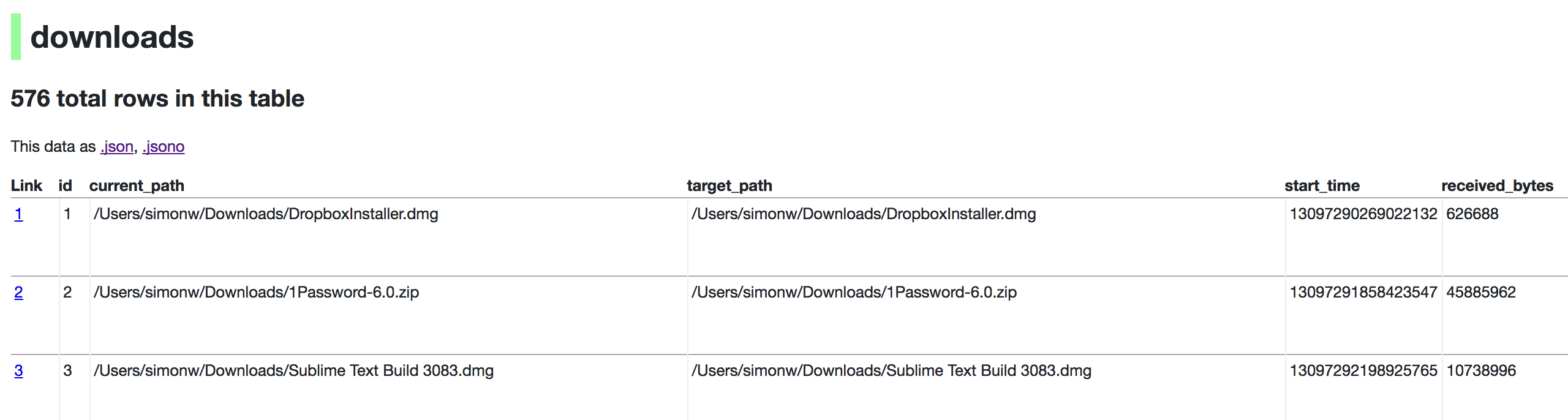
Now visiting http://localhost:8001/History/downloads will show you a web interface to browse your downloads data:
metadata.json
If you want to include licensing and source information in the generated datasette website you can do so using a JSON file that looks something like this:
{
    "title": "Five Thirty Eight",
    "license": "CC Attribution 4.0 License",
    "license_url": "http://creativecommons.org/licenses/by/4.0/",
    "source": "fivethirtyeight/data on GitHub",
    "source_url": "https://github.com/fivethirtyeight/data"
}
Save this in metadata.json and run Datasette like so:
datasette serve fivethirtyeight.db -m metadata.json
The license and source information will be displayed on the index page and in the footer. They will also be included in the JSON produced by the API.
datasette publish
If you have Heroku or Google Cloud Run configured, Datasette can deploy one or more SQLite databases to the internet with a single command:
datasette publish heroku database.db
Or:
datasette publish cloudrun database.db
This will create a docker image containing both the datasette application and the specified SQLite database files. It will then deploy that image to Heroku or Cloud Run and give you a URL to access the resulting website and API.
See Publishing data in the documentation for more details.
Datasette Lite
Datasette Lite is Datasette packaged using WebAssembly so that it runs entirely in your browser, no Python web application server required. Read more about that in the Datasette Lite documentation.