- Python 81.2%
- JavaScript 10.2%
- HTML 5.8%
- CSS 2.6%
- Shell 0.1%
 f0645c6ddf
* Add create table UI Adds a permission-gated database action that opens a create table modal on database pages, backed by the existing create-table JSON API. The modal starts with an id integer primary key column plus a blank text column, supports SQLite type selection, and shows custom column type controls only when the actor can set column types. Selected custom column types are applied after table creation with follow-up set-column-type API calls. Includes styling plus HTML and Playwright coverage for the action payload and create-table flow. * Add alter table JSON API - Add POST /<database>/<table>/-/alter with Pydantic validation and dry-run support. - Support add, rename, alter, drop, primary-key and reorder operations, including allow-listed default expressions. - Document the endpoint and cover schema changes, validation, permissions, events and dry runs. Refs #2788 * Add alter table modal - Register a built-in table action and expose alter-table metadata to table pages. - Build the client-side modal for editing columns, defaults, ordering, primary keys, and custom column types. - Add a review/apply confirmation flow with HTML and Playwright coverage. Refs #2788 * Ran Prettier * Isolate Unix domain socket test server paths - Use a per-process socket path for the UDS test fixture. - Clean up stale socket files before and after the fixture runs. - Close the HTTP client and wait for the Datasette subprocess to exit. * Precompute action permissions for table pages - Extract reusable helpers for database and table action permission preloading. - Precompute those permissions before building table-page HTML data. - Document the default table actions plugin. * Test against pyodide/v314.0.0 Now that we depend on pydantic we need a more recent pyodide in order to load the emscripten build of pydantic-core. Refs https://github.com/simonw/datasette/pull/2789#issuecomment-4733412763 * Split table create and alter views - Move create-table and alter-table API views into table_create_alter.py. - Keep create and alter schema-editing constants and helpers together. - Rename the create table modal context helper. * Add foreign keys to create table API - Add fk_table and optional fk_column support to create-table columns. - Validate create-table requests with Pydantic while preserving existing errors. - Document the API and cover inferred primary-key and validation cases. Refs https://github.com/simonw/datasette/pull/2789#issuecomment-4733544452 * Add foreign keys to alter table API - Add add_foreign_key, drop_foreign_key, and set_foreign_keys operations. - Validate flat fk_table and fk_column arguments with Pydantic. - Document the API and cover inferred primary-key and validation cases. * /db/table/-/foreign-key-suggestions API Improved version of the implementation datasette-edit-schema * /<database>/-/foreign-key-targets API endpoint Returns a list of tables with a single primary key, and for each one the name of that primary key column and its SQLite type affinity. This will be used by the create table UI to suggest foreign keys. * Expose foreign key targets to create table UI - Add foreignKeyTargetsPath to create table page data - Filter hidden tables from database-level foreign key target results - Update JSON API docs and tests for filtered targets * Add foreign key controls to create table dialog - Add create table advanced controls for foreign keys and first-column primary keys - Share schema dialog row helpers between create and alter dialogs - Move custom type into advanced options and add Add column icons * More robust test_datasette_https_server.sh test * Make custom type and foreign key mutually exclusive In the create table dialog a column can now have either a custom display type or a foreign key target, but not both - a foreign key column's type is determined by the referenced primary key, so a custom type doesn't apply. Setting one clears and disables the other, and the foreign key select stays disabled on the primary key column and when no targets exist. Also add "Controls how Datasette displays and edits this column" help text (with aria-describedby) under the custom type selector in both the create and alter dialogs, and style the alter dialog help text. * Drop table button in alter dialog * Object not chain of ifs Refs https://github.com/simonw/datasette/pull/2789/changes#r3453964430 * Fix broken Playwright tests * Keyword arguments for readability * Ran prettier * Removed the alter table dry run feature It works by doing conn.backup(memory_conn) which could use a lot of memory for a large database. * sqlite-utils>=3.30,<4.0 So we don't get test failures from reformatted SQL. * not_null, default and default_exr support for create table API columns * Alter table API can now rename tables, refs #2788 Refs https://github.com/simonw/datasette/pull/2789#issuecomment-4771774289 * Fix for Safari select box heights Refs https://github.com/simonw/datasette/pull/2789#issuecomment-4772241681 * Expose foreign key data to alter table UI Include current foreign key metadata in the alter table page data and allow the foreign-key-targets endpoint to be read by actors with alter-table permission for a specific table. Add API and HTML data tests for the new alter-table foreign key support. * Unify create and alter table modal controls Share default value controls between the create and alter table dialogs and expose create-table default expressions to the frontend. Add create-table not-null/default handling and align the shared foreign key picker behavior across both dialogs. * Add rename table controls to alter table dialog Add a collapsed rename-table section to the alter table modal and include rename_table operations in the review/apply flow. Redirect to the renamed table URL after applying changes and cover the review text in Playwright. * current_unixtime and current_unixtime_ms default_expr options Plus tweaked how alter table changing those works a bit. * Draft changelog for create/alter table UI, refs #2787, #2788 |
||
|---|---|---|
| .github | ||
| datasette | ||
| demos | ||
| docs | ||
| tests | ||
| .coveragerc | ||
| .dockerignore | ||
| .git-blame-ignore-revs | ||
| .gitattributes | ||
| .gitignore | ||
| .isort.cfg | ||
| .prettierrc | ||
| .readthedocs.yaml | ||
| CODE_OF_CONDUCT.md | ||
| codecov.yml | ||
| Dockerfile | ||
| Justfile | ||
| LICENSE | ||
| MANIFEST.in | ||
| package-lock.json | ||
| package.json | ||
| pyproject.toml | ||
| pytest.ini | ||
| README.md | ||
| ruff.toml | ||
| setup.cfg | ||
| test-in-pyodide-with-shot-scraper.sh | ||








An open source multi-tool for exploring and publishing data
Datasette is a tool for exploring and publishing data. It helps people take data of any shape or size and publish that as an interactive, explorable website and accompanying API.
Datasette is aimed at data journalists, museum curators, archivists, local governments, scientists, researchers and anyone else who has data that they wish to share with the world.
Explore a demo, watch a video about the project or try it out on GitHub Codespaces.
- datasette.io is the official project website
- Latest Datasette News
- Comprehensive documentation: https://docs.datasette.io/
- Examples: https://datasette.io/examples
- Live demo of current
mainbranch: https://latest.datasette.io/ - Questions, feedback or want to talk about the project? Join our Discord
Want to stay up-to-date with the project? Subscribe to the Datasette newsletter for tips, tricks and news on what's new in the Datasette ecosystem.
Installation
If you are on a Mac, Homebrew is the easiest way to install Datasette:
brew install datasette
You can also install it using pip or pipx:
pip install datasette
Datasette requires Python 3.8 or higher. We also have detailed installation instructions covering other options such as Docker.
Basic usage
datasette serve path/to/database.db
This will start a web server on port 8001 - visit http://localhost:8001/ to access the web interface.
serve is the default subcommand, you can omit it if you like.
Use Chrome on OS X? You can run datasette against your browser history like so:
datasette ~/Library/Application\ Support/Google/Chrome/Default/History --nolock
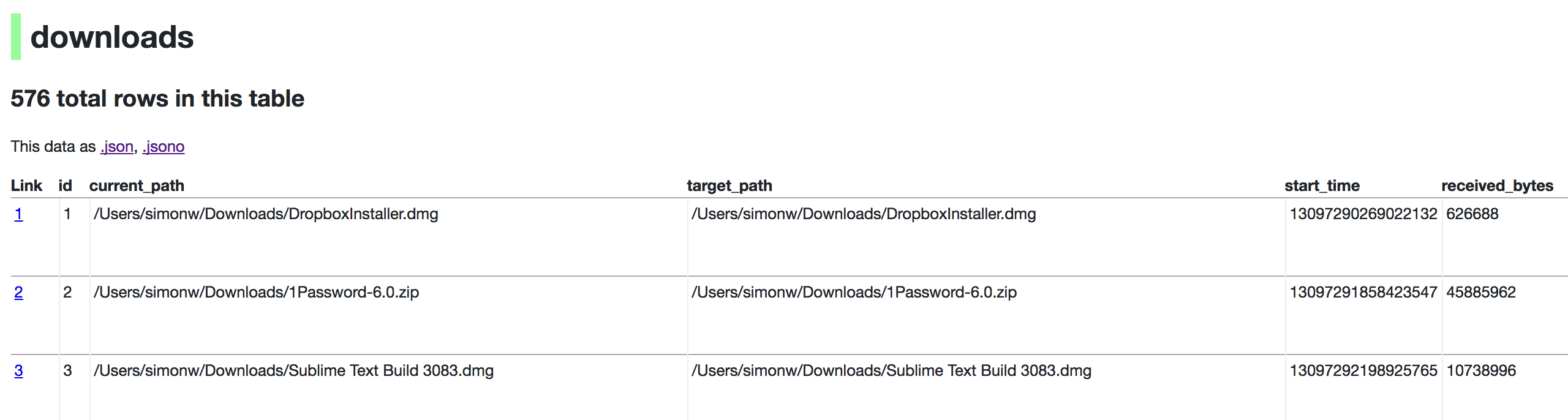
Now visiting http://localhost:8001/History/downloads will show you a web interface to browse your downloads data:
metadata.json
If you want to include licensing and source information in the generated datasette website you can do so using a JSON file that looks something like this:
{
    "title": "Five Thirty Eight",
    "license": "CC Attribution 4.0 License",
    "license_url": "http://creativecommons.org/licenses/by/4.0/",
    "source": "fivethirtyeight/data on GitHub",
    "source_url": "https://github.com/fivethirtyeight/data"
}
Save this in metadata.json and run Datasette like so:
datasette serve fivethirtyeight.db -m metadata.json
The license and source information will be displayed on the index page and in the footer. They will also be included in the JSON produced by the API.
datasette publish
If you have Heroku or Google Cloud Run configured, Datasette can deploy one or more SQLite databases to the internet with a single command:
datasette publish heroku database.db
Or:
datasette publish cloudrun database.db
This will create a docker image containing both the datasette application and the specified SQLite database files. It will then deploy that image to Heroku or Cloud Run and give you a URL to access the resulting website and API.
See Publishing data in the documentation for more details.
Datasette Lite
Datasette Lite is Datasette packaged using WebAssembly so that it runs entirely in your browser, no Python web application server required. Read more about that in the Datasette Lite documentation.