- Python 79.4%
- JavaScript 11.4%
- HTML 6.2%
- CSS 2.7%
- Shell 0.1%
 f5eada266e
Nothing in Datasette created a span for the HTTP request itself, so every span the database layer emits was a root span. Measured on this branch: one faceted table page produces 70 spans in 36 separate traces, none of which carries a URL. A trace UI shows that as dozens of unrelated single-span traces per page, interleaved across concurrent requests - worse than ?_trace=1 at the exact job people reach for tracing to do. With the request span it is 71 spans in 1 trace. `opentelemetry-instrument` does not fix this on its own: auto-instrumentation only picks up frameworks that ship an instrumentor entry point, and Datasette's raw ASGI app is not one. TelemetryMiddleware is mounted outermost in Datasette.app(), after the asgi_wrapper() plugin loop, so plugin middleware and the CSRF layer run *inside* the span. Putting it in DatasetteRouter instead would leave a span created by an instrumented plugin as an orphan root - reintroducing the problem for exactly the code most likely to be instrumented. It stays at ~90 lines, against roughly 700 for opentelemetry-instrumentation-asgi, because Datasette's app does not return before its body is sent: route_path awaits response.asgi_send(send), and a streaming CSV export runs its generator inline inside AsgiStream.asgi_send. So a plain `finally` covers the response body and no deferred-end machinery is needed. Two decisions worth flagging for review: - Inbound W3C traceparent and baggage are extracted, using the *global* propagator. That is the ecosystem norm (Flask, Django, FastAPI, the ASGI instrumentation), and going through the global propagator leaves the operator in control with no Datasette setting to invent: OTEL_PROPAGATORS=none disables it entirely. A public instance that does not want client-influenced traces should strip those headers at the proxy. - url.query is not recorded, anywhere. Datasette query strings carry user-supplied SQL in ?sql= and canned query parameters. client.address is not recorded either. The status code is sniffed from the ASGI http.response.start message rather than read off a Response, because asgi_static, the favicon route, AsgiStream and AsgiFileDownload all send that message themselves and never build one. Only a >= 500 sets an error status - per semantic conventions a 4xx is the client's mistake, and Datasette 404s are routine enough that treating them as errors would bury a real 500. The registry gains a `dynamic` flag, because this span's name is composed at runtime and so can never equal a fixed registry string. Dynamic entries resolve by span kind instead, and only after exact and prefix matching has failed, so they cannot shadow a span that does have a registered name. Co-Authored-By: Claude Opus 5 <noreply@anthropic.com> |
||
|---|---|---|
| .github | ||
| datasette | ||
| demos | ||
| docs | ||
| tests | ||
| .coveragerc | ||
| .dockerignore | ||
| .git-blame-ignore-revs | ||
| .gitattributes | ||
| .gitignore | ||
| .isort.cfg | ||
| .prettierrc | ||
| .readthedocs.yaml | ||
| CODE_OF_CONDUCT.md | ||
| codecov.yml | ||
| Dockerfile | ||
| Justfile | ||
| LICENSE | ||
| MANIFEST.in | ||
| package-lock.json | ||
| package.json | ||
| pyproject.toml | ||
| pytest.ini | ||
| README.md | ||
| ruff.toml | ||
| setup.cfg | ||
| test-in-pyodide-with-shot-scraper.sh | ||








An open source multi-tool for exploring and publishing data
Datasette is a tool for exploring and publishing data. It helps people take data of any shape or size and publish that as an interactive, explorable website and accompanying API.
Datasette is aimed at data journalists, museum curators, archivists, local governments, scientists, researchers and anyone else who has data that they wish to share with the world.
Explore a demo, watch a video about the project or try it out on GitHub Codespaces.
- datasette.io is the official project website
- Latest Datasette News
- Comprehensive documentation: https://docs.datasette.io/
- Examples: https://datasette.io/examples
- Live demo of current
mainbranch: https://latest.datasette.io/ - Questions, feedback or want to talk about the project? Join our Discord
Want to stay up-to-date with the project? Subscribe to the Datasette newsletter for tips, tricks and news on what's new in the Datasette ecosystem.
Installation
If you are on a Mac, Homebrew is the easiest way to install Datasette:
brew install datasette
You can also install it using pip or pipx:
pip install datasette
Datasette requires Python 3.8 or higher. We also have detailed installation instructions covering other options such as Docker.
Basic usage
datasette serve path/to/database.db
This will start a web server on port 8001 - visit http://localhost:8001/ to access the web interface.
serve is the default subcommand, you can omit it if you like.
Use Chrome on OS X? You can run datasette against your browser history like so:
datasette ~/Library/Application\ Support/Google/Chrome/Default/History --nolock
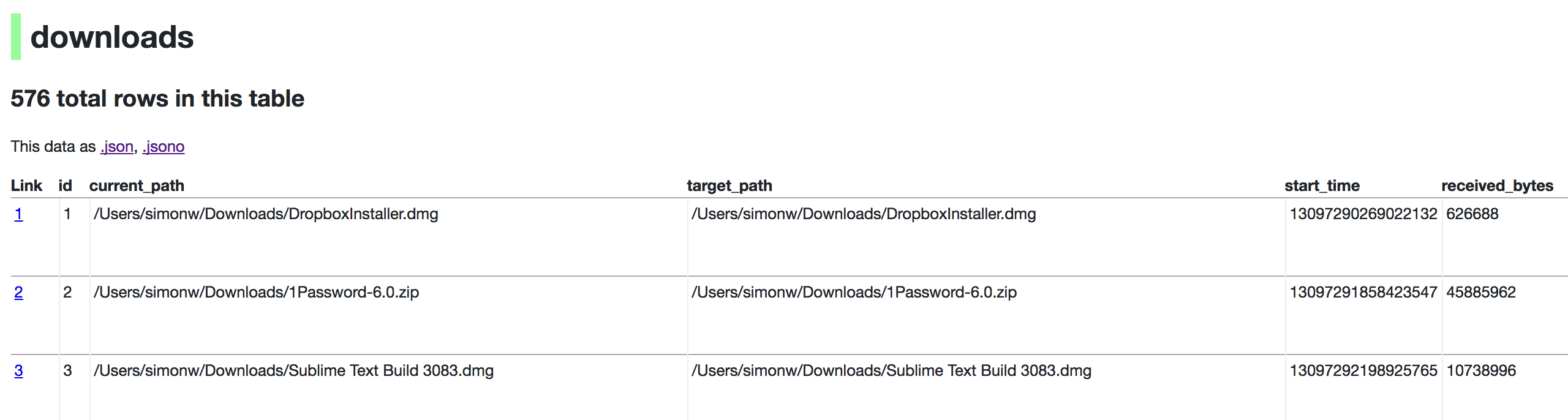
Now visiting http://localhost:8001/History/downloads will show you a web interface to browse your downloads data:
metadata.json
If you want to include licensing and source information in the generated datasette website you can do so using a JSON file that looks something like this:
{
    "title": "Five Thirty Eight",
    "license": "CC Attribution 4.0 License",
    "license_url": "http://creativecommons.org/licenses/by/4.0/",
    "source": "fivethirtyeight/data on GitHub",
    "source_url": "https://github.com/fivethirtyeight/data"
}
Save this in metadata.json and run Datasette like so:
datasette serve fivethirtyeight.db -m metadata.json
The license and source information will be displayed on the index page and in the footer. They will also be included in the JSON produced by the API.
datasette publish
If you have Heroku or Google Cloud Run configured, Datasette can deploy one or more SQLite databases to the internet with a single command:
datasette publish heroku database.db
Or:
datasette publish cloudrun database.db
This will create a docker image containing both the datasette application and the specified SQLite database files. It will then deploy that image to Heroku or Cloud Run and give you a URL to access the resulting website and API.
See Publishing data in the documentation for more details.
Datasette Lite
Datasette Lite is Datasette packaged using WebAssembly so that it runs entirely in your browser, no Python web application server required. Read more about that in the Datasette Lite documentation.