My Neovim configuration
- Lua 88%
- TeX 11.5%
- Shell 0.5%
| lua/weeheavy | ||
| CHEATSHEET.md | ||
| init.lua | ||
| lazy-lock.json | ||
| README.md | ||
| sample.png | ||


My Neovim configuration
Motivation
After doing my first steps with https://github.com/nvim-lua/kickstart.nvim, I decided to roll my own, custom, "lightweight" Neovim configuration in order to better understand Neovim and its configuration/customization, package managers, plugins etc. and have "my own" config that only includes things I really need.
Installation
- Install Neovim 0.9.x
- Install OS dependencies documented in
init.lua - Clone this Git repository to
~/.config/nvim
Finishing touches
- Install Treesitter comment parser (to highlight
FIXME:/NOTE:/TODO:/XXX:) with:TSInstall comment - Create a
$HOME/.ignorefile and add big, useless directories to it, so Telescope/ripgrep/fd can ignore those. My current list of files/directories is available inlua/weeheavy/plugins/telescope-fzf-native.lua
Speed
Output from lazy.nvim profiling (:Lazy, then P):
Start and open init.lua
Startuptime: 79.91ms

Based on the actual CPU time of the Neovim process till UIEnter.
This is more accurate than `nvim --startuptime`.
  LazyStart 11.53ms
  LazyDone  46.36ms (+34.83ms)
  UIEnter   79.91ms (+33.55ms)
Starting with empty file
Around 50% of the plugins are lazy-loaded.
Startuptime: 47.58ms

Based on the actual CPU time of the Neovim process till UIEnter.
This is more accurate than `nvim --startuptime`.
  LazyStart 11.16ms
  LazyDone  41.83ms (+30.67ms)
  UIEnter   47.58ms (+5.75ms)
Plugins
| Name | Purpose | URL |
|---|---|---|
| lazy.nvim | Package manager | https://github.com/folke/lazy.nvim |
| telescope.nvim | Find, Filter, Preview, Pick | https://github.com/nvim-telescope/telescope.nvim |
| telescope-fzf-native.nvim | Fuzzy finder for Telescope | https://github.com/nvim-telescope/telescope-fzf-native.nvim |
| telescope-file-browser.nvim | File browser | https://github.com/nvim-telescope/telescope-file-browser.nvim |
| nvim-treesitter | Parser/syntax highlighting | https://github.com/nvim-treesitter/nvim-treesitter |
| nvim-treesitter-context | Shows current line context | https://github.com/nvim-treesitter/nvim-treesitter-context |
| nvim-treesitter-textobjects | ? | https://github.com/nvim-treesitter/nvim-treesitter-textobjects |
| nightfox.nvim | Theme with treesitter/lsp support | https://github.com/EdenEast/nightfox.nvim |
| tokyonight.nvim | Theme with treesitter/lsp support | https://github.com/folke/tokyonight.nvim |
| lualine.nvim | Status line | https://github.com/nvim-lualine/lualine.nvim |
| nvim-web-devicons | filetype glyphs (icons) for plugins | https://github.com/nvim-tree/nvim-web-devicons |
| gitsigns.nvim | Git change indicator | https://github.com/lewis6991/gitsigns.nvim |
| which-key.nvim | Shows contextual key bindings | https://github.com/folke/which-key.nvim |
| indent-blankline.nvim | Visual indentation guide | https://github.com/lukas-reineke/indent-blankline.nvim |
| vim-illuminate | Highlight similar words (w/ LSP, Treesitter, regex) | https://github.com/RRethy/vim-illuminate |
| lsp-zero.nvim | LSP for mere mortals | https://github.com/VonHeikemen/lsp-zero.nvim |
| nvim-lspconfig | Component of lsp-zero.nvim | https://github.com/neovim/nvim-lspconfig |
| cmp-nvim-lsp | Dependency of lsp-zero.nvim | https://github.com/hrsh7th/cmp-nvim-lsp |
| conform.nvim | Black magic wizardry, replacement for null-ls |
https://github.com/stevearc/conform.nvim |
| mason.nvim | Install/manage LSP/DAP servers, linters and formatters | https://github.com/williamboman/mason.nvim |
| mason-lspconfig.nvim | Bridges mason.nvim with the lspconfig plugin | https://github.com/williamboman/mason-lspconfig.nvim |
| zen-mode.nvim | Distraction-free coding for Neovim | https://github.com/folke/zen-mode.nvim |
| twilight.nvim | Dims inactive portions of the code you're editing | https://github.com/folke/twilight.nvim |
Looks
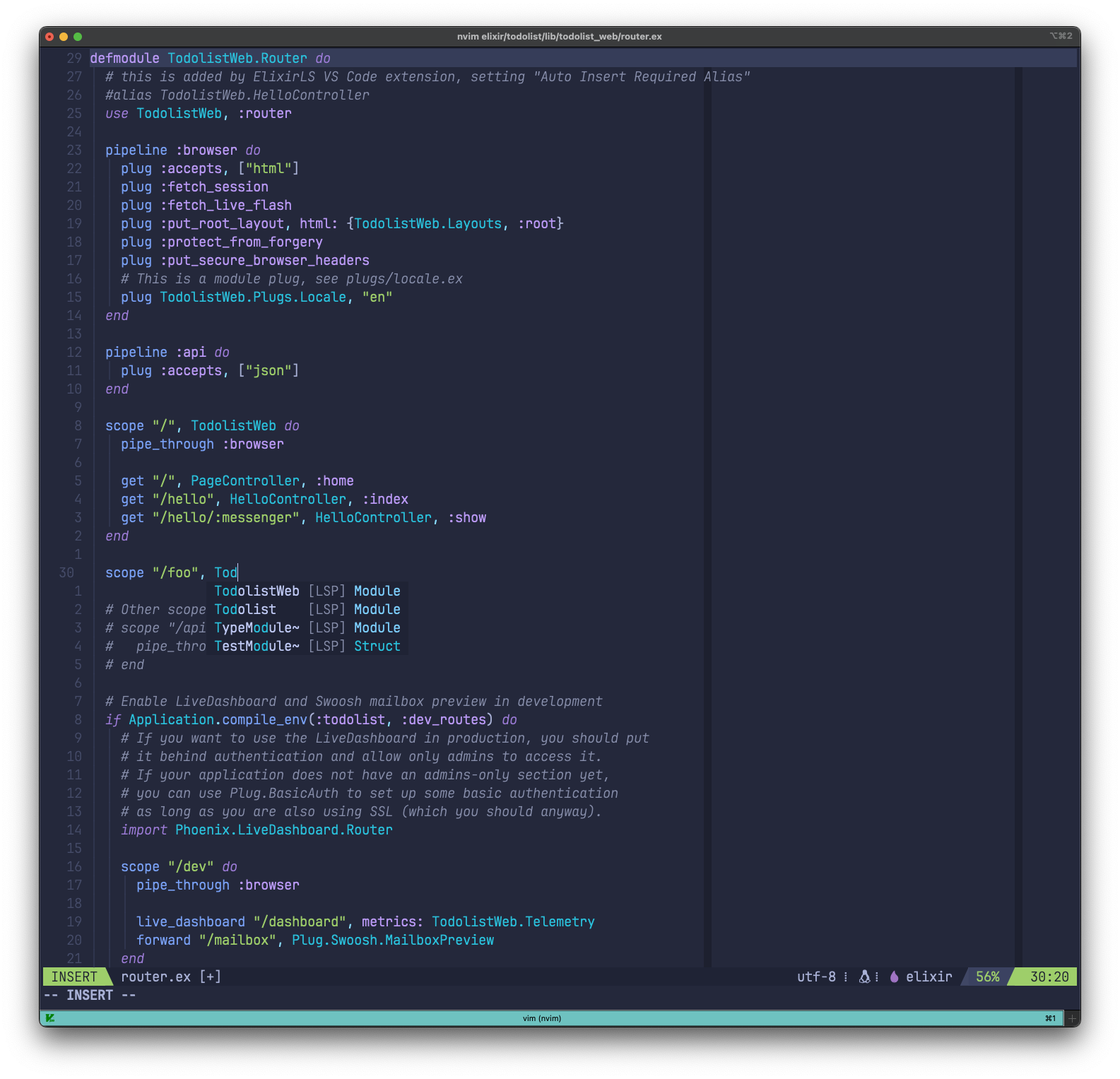
This is how it looks like:
Open issues/TODOs
- ollama integration https://github.com/nomnivore/ollama.nvim
- Solution to run file_browser when doing a vertical/horizontal split?
- https://github.com/folke/trouble.nvim
- Implement linting, see https://www.josean.com/posts/neovim-linting-and-formatting