mirror of
https://github.com/simonw/datasette.git
synced 2025-12-10 16:51:24 +01:00
 8252e71da4
If someone executes 'select * from table' against a table with a million rows
in it, we could run into problems: just serializing that much data as JSON is
likely to lock up the server.

Solution: we now have a hard limit on the maximum number of rows that can be
returned by a query. If that limit is exceeded, the server will return a
`"truncated": true` field in the JSON.

This limit can be optionally controlled by the new `--max_returned_rows`
option. Setting that option to 0 disables the limit entirely.

Closes #69
150 lines
5.5 KiB
Markdown
150 lines
5.5 KiB
Markdown
# datasette
|
|
|
|
[](https://pypi.python.org/pypi/datasette)
|
|
*An instant JSON API for your SQLite database*
|
|
|
|
Datasette provides an instant, read-only JSON API for any SQLite database. It also provides tools for packaging the database up as a Docker container and deploying that container to hosting providers such as [Zeit Now](https://zeit.co/now).
|
|
|
|
## Installation
|
|
|
|
pip3 install datasette
|
|
|
|
Datasette requires Python 3.5 or higher.
|
|
|
|
## Basic usage
|
|
|
|
datasette serve path/to/database.db
|
|
|
|
This will start a web server on port 8001 - visit http://localhost:8001/ to access the web interface.
|
|
|
|
`serve` is the default subcommand, you can omit it if you like.
|
|
|
|
Use Chrome on OS X? You can run datasette against your browser history like so:
|
|
|
|
datasette ~/Library/Application\ Support/Google/Chrome/Default/History
|
|
|
|
Now visiting http://localhost:8001/History/downloads will show you a web interface to browse your downloads data:
|
|
|
|
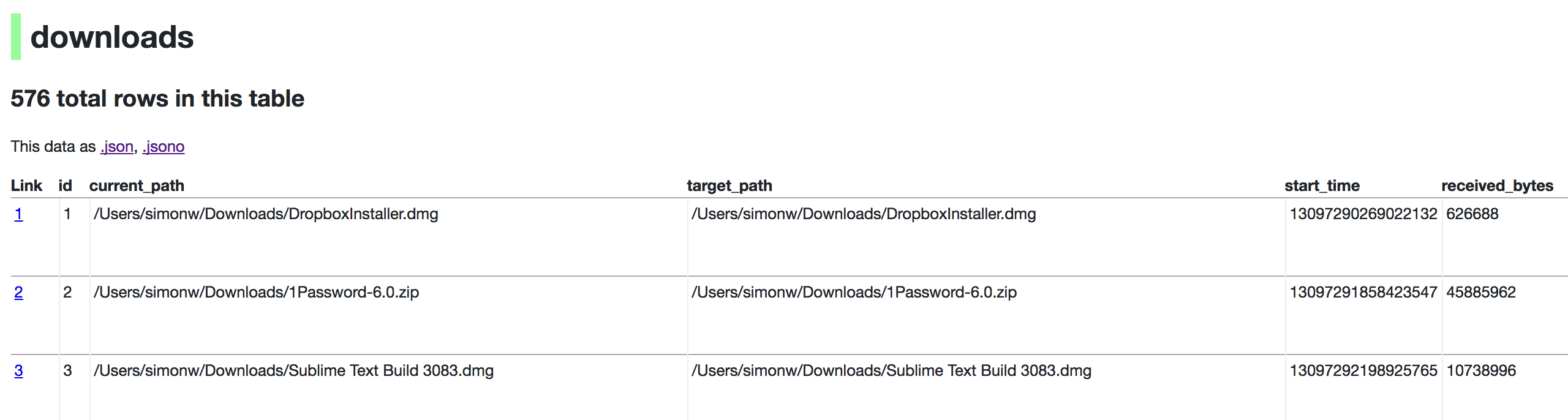
|
|
|
|
http://localhost:8001/History/downloads.json will return that data as JSON:
|
|
|
|
{
|
|
"database": "History",
|
|
"columns": [
|
|
"id",
|
|
"current_path",
|
|
"target_path",
|
|
"start_time",
|
|
"received_bytes",
|
|
"total_bytes",
|
|
...
|
|
],
|
|
"table_rows": 576,
|
|
"rows": [
|
|
[
|
|
1,
|
|
"/Users/simonw/Downloads/DropboxInstaller.dmg",
|
|
"/Users/simonw/Downloads/DropboxInstaller.dmg",
|
|
13097290269022132,
|
|
626688,
|
|
0,
|
|
...
|
|
]
|
|
]
|
|
}
|
|
|
|
|
|
http://localhost:8001/History/downloads.jsono will return that data as JSON in a more convenient but less efficient format:
|
|
|
|
{
|
|
...
|
|
"rows": [
|
|
{
|
|
"start_time": 13097290269022132,
|
|
"interrupt_reason": 0,
|
|
"hash": "",
|
|
"id": 1,
|
|
"site_url": "",
|
|
"referrer": "https://www.dropbox.com/downloading?src=index",
|
|
...
|
|
}
|
|
]
|
|
}
|
|
|
|
## datasette serve options
|
|
|
|
$ datasette serve --help
|
|
Usage: datasette serve [OPTIONS] [FILES]...
|
|
|
|
Serve up specified SQLite database files with a web UI
|
|
|
|
Options:
|
|
-h, --host TEXT host for server, defaults to 0.0.0.0
|
|
-p, --port INTEGER port for server, defaults to 8001
|
|
--debug Enable debug mode - useful for development
|
|
--reload Automatically reload if code change detected -
|
|
useful for development
|
|
--cors Enable CORS by serving Access-Control-Allow-
|
|
Origin: *
|
|
--page_size INTEGER Page size - default is 100
|
|
--max_returned_rows INTEGER Max allowed rows to return at once - default is
|
|
1000. Set to 0 to disable check entirely.
|
|
--inspect-file TEXT Path to JSON file created using "datasette
|
|
build"
|
|
-m, --metadata FILENAME Path to JSON file containing license/source
|
|
metadata
|
|
--help Show this message and exit.
|
|
|
|
## metadata.json
|
|
|
|
If you want to include licensing and source information in the generated datasette website you can do so using a JSON file that looks something like this:
|
|
|
|
{
|
|
"title": "Five Thirty Eight",
|
|
"license": "CC Attribution 4.0 License",
|
|
"license_url": "http://creativecommons.org/licenses/by/4.0/",
|
|
"source": "fivethirtyeight/data on GitHub",
|
|
"source_url": "https://github.com/fivethirtyeight/data"
|
|
}
|
|
|
|
The license and source information will be displayed on the index page and in the footer. They will also be included in the JSON produced by the API.
|
|
|
|
## datasette publish
|
|
|
|
If you have [Zeit Now](https://zeit.co/now) installed, datasette can deploy one or more SQLite databases to the internet with a single command:
|
|
|
|
datasette publish now database.db
|
|
|
|
This will create a docker image containing both the datasette application and the specified SQLite database files. It will then deploy that image to Zeit Now and give you a URL to access the API.
|
|
|
|
$ datasette publish --help
|
|
Usage: datasette publish [OPTIONS] PUBLISHER [FILES]...
|
|
|
|
Publish specified SQLite database files to the internet along with a
|
|
datasette API.
|
|
|
|
Only current option for PUBLISHER is 'now'. You must have Zeit Now
|
|
installed: https://zeit.co/now
|
|
|
|
Example usage: datasette publish now my-database.db
|
|
|
|
Options:
|
|
-n, --name TEXT Application name to use when deploying to Now
|
|
-m, --metadata FILENAME Path to JSON file containing metadata to publish
|
|
--help Show this message and exit.
|
|
|
|
## datasette package
|
|
|
|
If you have docker installed you can use `datasette package` to create a new Docker image in your local repository containing the datasette app and selected SQLite databases:
|
|
|
|
$ datasette package --help
|
|
Usage: datasette package [OPTIONS] FILES...
|
|
|
|
Package specified SQLite files into a new datasette Docker container
|
|
|
|
Options:
|
|
-t, --tag TEXT Name for the resulting Docker container, can
|
|
optionally use name:tag format
|
|
-m, --metadata FILENAME Path to JSON file containing metadata to publish
|
|
--help Show this message and exit.
|