mirror of
https://github.com/simonw/datasette.git
synced 2025-12-10 16:51:24 +01:00
 1e698787a4
The serve command now accepts --sql_time_limit_ms for customizing the SQL time
limit.

The publish and package commands now accept --extra-options which can be used
to specify additional options to be passed to the datasite serve command when
it executes inside the rusulting Docker containers.
193 lines
7.4 KiB
Markdown
193 lines
7.4 KiB
Markdown
# datasette
|
|
|
|
[](https://pypi.python.org/pypi/datasette)
|
|
[](https://travis-ci.org/simonw/datasette)
|
|
|
|
*An instant JSON API for your SQLite databases*
|
|
|
|
Datasette provides an instant, read-only JSON API for any SQLite database. It also provides tools for packaging the database up as a Docker container and deploying that container to hosting providers such as [Zeit Now](https://zeit.co/now).
|
|
|
|
## Installation
|
|
|
|
pip3 install datasette
|
|
|
|
Datasette requires Python 3.5 or higher.
|
|
|
|
## Basic usage
|
|
|
|
datasette serve path/to/database.db
|
|
|
|
This will start a web server on port 8001 - visit http://localhost:8001/ to access the web interface.
|
|
|
|
`serve` is the default subcommand, you can omit it if you like.
|
|
|
|
Use Chrome on OS X? You can run datasette against your browser history like so:
|
|
|
|
datasette ~/Library/Application\ Support/Google/Chrome/Default/History
|
|
|
|
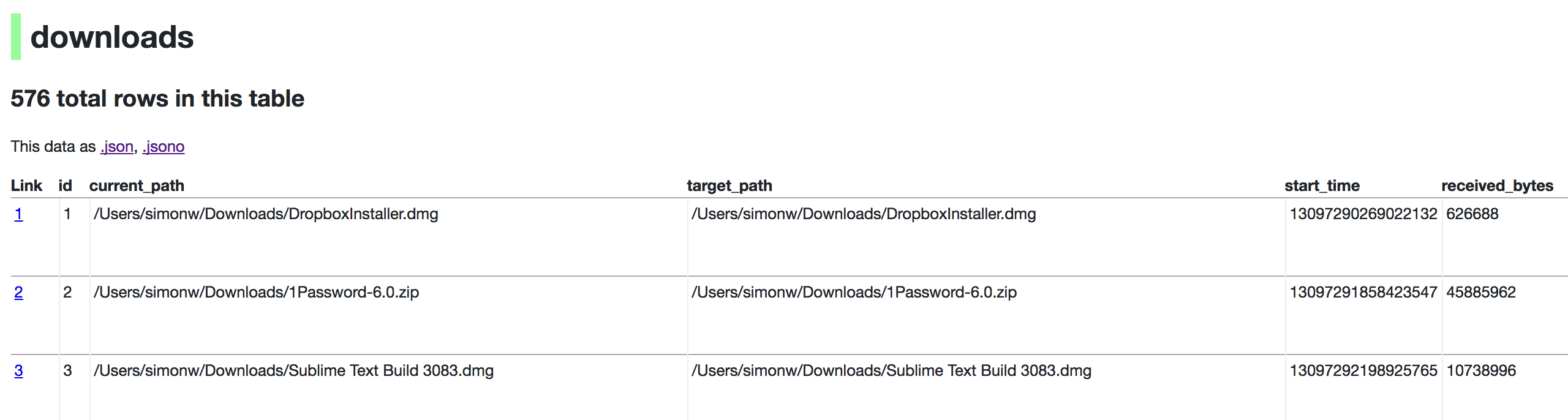
Now visiting http://localhost:8001/History/downloads will show you a web interface to browse your downloads data:
|
|
|
|
|
|
|
|
http://localhost:8001/History/downloads.json will return that data as JSON:
|
|
|
|
{
|
|
"database": "History",
|
|
"columns": [
|
|
"id",
|
|
"current_path",
|
|
"target_path",
|
|
"start_time",
|
|
"received_bytes",
|
|
"total_bytes",
|
|
...
|
|
],
|
|
"table_rows": 576,
|
|
"rows": [
|
|
[
|
|
1,
|
|
"/Users/simonw/Downloads/DropboxInstaller.dmg",
|
|
"/Users/simonw/Downloads/DropboxInstaller.dmg",
|
|
13097290269022132,
|
|
626688,
|
|
0,
|
|
...
|
|
]
|
|
]
|
|
}
|
|
|
|
|
|
http://localhost:8001/History/downloads.jsono will return that data as JSON in a more convenient but less efficient format:
|
|
|
|
{
|
|
...
|
|
"rows": [
|
|
{
|
|
"start_time": 13097290269022132,
|
|
"interrupt_reason": 0,
|
|
"hash": "",
|
|
"id": 1,
|
|
"site_url": "",
|
|
"referrer": "https://www.dropbox.com/downloading?src=index",
|
|
...
|
|
}
|
|
]
|
|
}
|
|
|
|
## datasette serve options
|
|
|
|
$ datasette serve --help
|
|
Usage: datasette serve [OPTIONS] [FILES]...
|
|
|
|
Serve up specified SQLite database files with a web UI
|
|
|
|
Options:
|
|
-h, --host TEXT host for server, defaults to 0.0.0.0
|
|
-p, --port INTEGER port for server, defaults to 8001
|
|
--debug Enable debug mode - useful for development
|
|
--reload Automatically reload if code change detected -
|
|
useful for development
|
|
--cors Enable CORS by serving Access-Control-Allow-
|
|
Origin: *
|
|
--page_size INTEGER Page size - default is 100
|
|
--max_returned_rows INTEGER Max allowed rows to return at once - default is
|
|
1000. Set to 0 to disable check entirely.
|
|
--sql_time_limit_ms INTEGER Max time allowed for SQL queries in ms
|
|
--inspect-file TEXT Path to JSON file created using "datasette
|
|
build"
|
|
-m, --metadata FILENAME Path to JSON file containing license/source
|
|
metadata
|
|
--help Show this message and exit.
|
|
|
|
## metadata.json
|
|
|
|
If you want to include licensing and source information in the generated datasette website you can do so using a JSON file that looks something like this:
|
|
|
|
{
|
|
"title": "Five Thirty Eight",
|
|
"license": "CC Attribution 4.0 License",
|
|
"license_url": "http://creativecommons.org/licenses/by/4.0/",
|
|
"source": "fivethirtyeight/data on GitHub",
|
|
"source_url": "https://github.com/fivethirtyeight/data"
|
|
}
|
|
|
|
The license and source information will be displayed on the index page and in the footer. They will also be included in the JSON produced by the API.
|
|
|
|
## datasette publish
|
|
|
|
If you have [Zeit Now](https://zeit.co/now) installed, datasette can deploy one or more SQLite databases to the internet with a single command:
|
|
|
|
datasette publish now database.db
|
|
|
|
This will create a docker image containing both the datasette application and the specified SQLite database files. It will then deploy that image to Zeit Now and give you a URL to access the API.
|
|
|
|
$ datasette publish --help
|
|
Usage: datasette publish [OPTIONS] PUBLISHER [FILES]...
|
|
|
|
Publish specified SQLite database files to the internet along with a
|
|
datasette API.
|
|
|
|
Only current option for PUBLISHER is 'now'. You must have Zeit Now
|
|
installed: https://zeit.co/now
|
|
|
|
Example usage: datasette publish now my-database.db
|
|
|
|
Options:
|
|
-n, --name TEXT Application name to use when deploying to Now
|
|
-m, --metadata FILENAME Path to JSON file containing metadata to publish
|
|
--extra-options TEXT Extra options to pass to datasette serve
|
|
--help Show this message and exit.
|
|
|
|
## datasette package
|
|
|
|
If you have docker installed you can use `datasette package` to create a new Docker image in your local repository containing the datasette app and selected SQLite databases:
|
|
|
|
$ datasette package --help
|
|
Usage: datasette package [OPTIONS] FILES...
|
|
|
|
Package specified SQLite files into a new datasette Docker container
|
|
|
|
Options:
|
|
-t, --tag TEXT Name for the resulting Docker container, can
|
|
optionally use name:tag format
|
|
-m, --metadata FILENAME Path to JSON file containing metadata to publish
|
|
--extra-options TEXT Extra options to pass to datasette serve
|
|
--help Show this message and exit.
|
|
|
|
Both publish and package accept an `extra_options` argument option, which will affect how the resulting application is executed. For example, say you want to increase the SQL time limit for a particular container:
|
|
|
|
datasette package parlgov.db --extra-options="--sql_time_limit_ms=2500 --page_size=10"
|
|
|
|
The resulting container will run the application with those options.
|
|
|
|
Here's example output for the package command:
|
|
|
|
$ datasette package parlgov.db --extra-options="--sql_time_limit_ms=2500 --page_size=10"
|
|
Sending build context to Docker daemon 4.459MB
|
|
Step 1/7 : FROM python:3
|
|
---> 79e1dc9af1c1
|
|
Step 2/7 : COPY . /app
|
|
---> Using cache
|
|
---> cd4ec67de656
|
|
Step 3/7 : WORKDIR /app
|
|
---> Using cache
|
|
---> 139699e91621
|
|
Step 4/7 : RUN pip install https://static.simonwillison.net/static/2017/datasette-0.9-py3-none-any.whl
|
|
---> Using cache
|
|
---> 340efa82bfd7
|
|
Step 5/7 : RUN datasette build parlgov.db --inspect-file inspect-data.json
|
|
---> Using cache
|
|
---> 5fddbe990314
|
|
Step 6/7 : EXPOSE 8001
|
|
---> Using cache
|
|
---> 8e83844b0fed
|
|
Step 7/7 : CMD datasette serve parlgov.db --port 8001 --inspect-file inspect-data.json --sql_time_limit_ms=2500 --page_size=10
|
|
---> Using cache
|
|
---> 1bd380ea8af3
|
|
Successfully built 1bd380ea8af3
|
|
|
|
You can now run the resulting container like so:
|
|
|
|
docker run -p 8081:8001 1bd380ea8af3
|
|
|
|
This exposes port 8001 inside the container as port 8081 on your host machine, so you can access the application at http://localhost:8081/
|