mirror of
https://github.com/basnijholt/adaptive-lighting.git
synced 2026-09-12 23:04:03 +02:00

122 lines
5.6 KiB
Markdown
122 lines
5.6 KiB
Markdown
---
|
|
icon: lucide/trending-up
|
|
---
|
|
|
|
# Brightness Modes
|
|
|
|
Enhance your control over brightness transitions during sunrise and sunset with the `brightness_mode` option.
|
|
|
|
## Available Modes
|
|
|
|
Adaptive Lighting supports three brightness modes:
|
|
|
|
| Mode | Description |
|
|
|------|-------------|
|
|
| `default` | Standard behavior based on sun position |
|
|
| `linear` | Linear ramp between min/max brightness |
|
|
| `tanh` | Smooth S-curve using hyperbolic tangent |
|
|
|
|
## Detailed Explanation
|
|
|
|
<!-- CODE:START -->
|
|
<!-- print(include_section("../../README.md", "brightness-modes", strip_heading=True)) -->
|
|
<!-- CODE:END -->
|
|
<!-- OUTPUT:START -->
|
|
<!-- ⚠️ This content is auto-generated by `markdown-code-runner`. -->
|
|
<details markdown="1">
|
|
<summary>Enhance your control over brightness transitions during sunrise and sunset with <code>brightness_mode</code> (click here to learn more 🧠).</summary>
|
|
|
|
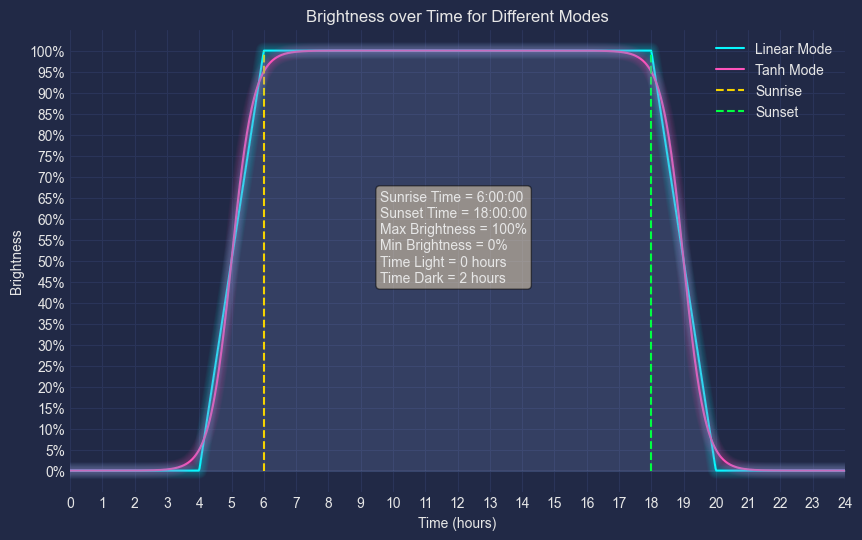
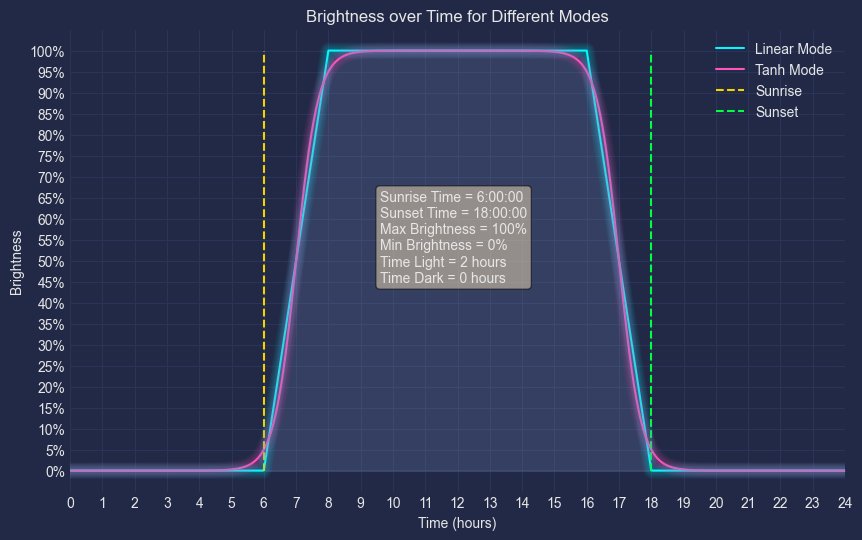
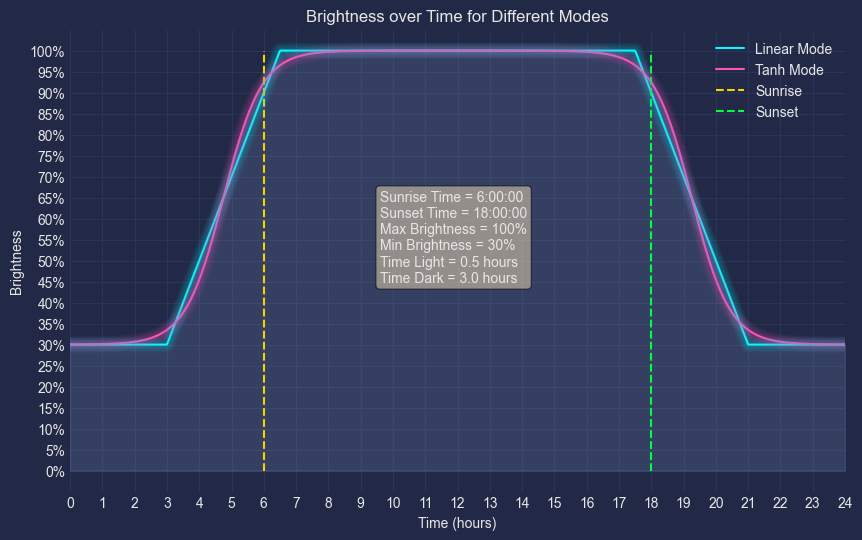
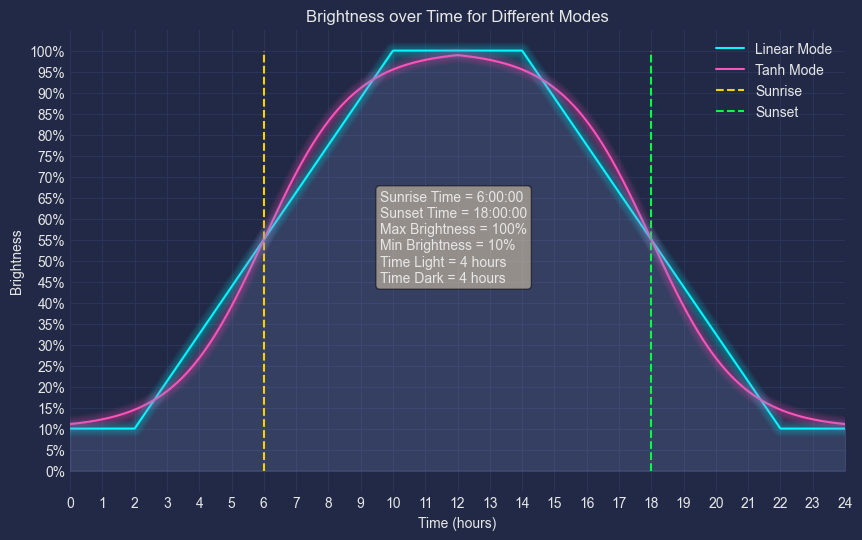
With Adaptive Lighting, you can set a `brightness_mode` to specify how the brightness changes during sunrise and sunset. The `brightness_mode` can be set to `"default"` ([as illustrated in other graphs above](#high_brightness-brightness)), `"linear"`, or `"tanh"`. If you choose to deviate from the `"default"` mode, you can adjust `brightness_mode_time_dark` and `brightness_mode_time_light` to further customize the lighting transitions.
|
|
|
|
When `brightness_mode` is set to `"linear"`:
|
|
|
|
- During **_sunset_**, the brightness begins to gradually decrease from `max_brightness` starting at `time=sunset_time - brightness_mode_time_light`, until it reaches `min_brightness` at `time=sunset_time + brightness_mode_time_dark`.
|
|
- During **_sunrise_**, the brightness begins to gradually increase from `min_brightness` starting at `time=sunrise_time - brightness_mode_time_dark`, until it reaches `max_brightness` at `time=sunrise_time + brightness_mode_time_light`.
|
|
|
|
When `brightness_mode` is set to `"tanh"`, it uses the smooth transition of a [hyperbolic tangent function](https://mathworld.wolfram.com/HyperbolicTangent.html):
|
|
|
|
- During **_sunset_**, the brightness starts to decrease from 95% of `max_brightness` starting at `time=sunset_time - brightness_mode_time_light`, until it reaches 5% of `min_brightness` at `time=sunset_time + brightness_mode_time_dark`.
|
|
- During **_sunrise_**, the brightness starts to increase from 5% of `min_brightness` starting at `time=sunrise_time - brightness_mode_time_dark`, until it reaches 95% of `max_brightness` at `time=sunrise_time + brightness_mode_time_light`.
|
|
</details>
|
|
|
|
Notice the values of `brightness_mode_time_light` and `brightness_mode_time_dark` in the text box.
|
|
|
|
|
|
|
|
|
|
|
|
> Check out the interactive webapp on https://basnijholt.github.io/adaptive-lighting/ to play with the parameters and see how the brightness changes!
|
|
|
|
<!-- OUTPUT:END -->
|
|
|
|
## Configuration Parameters
|
|
|
|
When using `linear` or `tanh` modes, you can fine-tune the transition with these parameters:
|
|
|
|
| Parameter | Default | Description |
|
|
|-----------|---------|-------------|
|
|
| `brightness_mode_time_dark` | 900 (15 min) | Duration to ramp brightness before/after sunrise/sunset |
|
|
| `brightness_mode_time_light` | 3600 (1 hour) | Duration to ramp brightness after/before sunrise/sunset |
|
|
|
|
## Example Configurations
|
|
|
|
### Quick Transition (Linear)
|
|
|
|
```yaml
|
|
adaptive_lighting:
|
|
- name: "Quick transitions"
|
|
lights:
|
|
- light.living_room
|
|
brightness_mode: linear
|
|
brightness_mode_time_dark: 600 # 10 minutes
|
|
brightness_mode_time_light: 1800 # 30 minutes
|
|
```
|
|
|
|
### Smooth Transition (Tanh)
|
|
|
|
```yaml
|
|
adaptive_lighting:
|
|
- name: "Smooth transitions"
|
|
lights:
|
|
- light.bedroom
|
|
brightness_mode: tanh
|
|
brightness_mode_time_dark: 1200 # 20 minutes
|
|
brightness_mode_time_light: 3600 # 1 hour
|
|
```
|
|
|
|
## Graphs
|
|
|
|
These graphs show how brightness changes throughout the day based on calculated values:
|
|
|
|
<!-- CODE:START -->
|
|
<!-- print(include_section("../../README.md", "graphs", strip_heading=True)) -->
|
|
<!-- CODE:END -->
|
|
<!-- OUTPUT:START -->
|
|
<!-- ⚠️ This content is auto-generated by `markdown-code-runner`. -->
|
|
These graphs were generated using the values calculated by the Adaptive Lighting sensor/switch(es).
|
|
|
|
### :sunny: Sun Position
|
|

|
|
|
|
### :thermometer: Color Temperature
|
|

|
|
|
|
### :high_brightness: Brightness
|
|

|
|
|
|
### While using `transition_until_sleep: true`
|
|

|
|
|
|
<!-- OUTPUT:END -->
|
|
|
|
## Interactive Simulator
|
|
|
|
The best way to understand brightness modes is to experiment with the interactive simulator:
|
|
|
|
<div style="text-align: center; margin: 2rem 0;">
|
|
<a href="../simulator/" class="simulator-link">
|
|
Try the Simulator
|
|
</a>
|
|
</div>
|
|
|
|
Adjust the `brightness_mode`, `brightness_mode_time_dark`, and `brightness_mode_time_light` parameters to see how they affect the brightness curve in real-time.
|